
Connect a receipt printer
Print kitchen tickets and customer bills straight to an Epson receipt printer on your restaurant's Wi-Fi.
Who can do thisOwnerManagerStaff
Ramzi prints straight to an Epson receipt printer with ePOS-Print on the same network as your tablet, with no app or computer in between. Supported models include the Epson TM-m30II, TM-m30III, TM-m50 and TM-T20III-i.
Printer settings are saved on each device. Set them up on every tablet or computer that should print.
#What you need
- A supported Epson printer, switched on and connected to your restaurant's network (Wi-Fi or a network cable).
- The tablet or computer running the dashboard on the same network.
- The printer's IP address.
#1. Find the printer's IP address
Turn the printer off. Hold the FEED button while you turn it back on, and release it when it starts printing. It prints a status sheet that shows its IP address, for example 192.168.1.50.
Ask whoever manages your router to give the printer a fixed IP address. Otherwise the address can change after a power cut, and printing stops until you update it.
#2. Enter it in Ramzi
- Go to Settings → Printers.
- Under Receipt printer (LAN), enter the Printer IP / host, for example 192.168.1.50. If your printer uses a non-standard port, add it, for example 192.168.1.50:8043.
- Leave Device ID as local_printer, unless your printer has several devices set up.
- Leave Protocol on HTTP. Choose HTTPS only if your printer is set up for it.
- Set the other options. See The printer options below.
- Click Save changes in the bar at the bottom.
- Click Print test page.
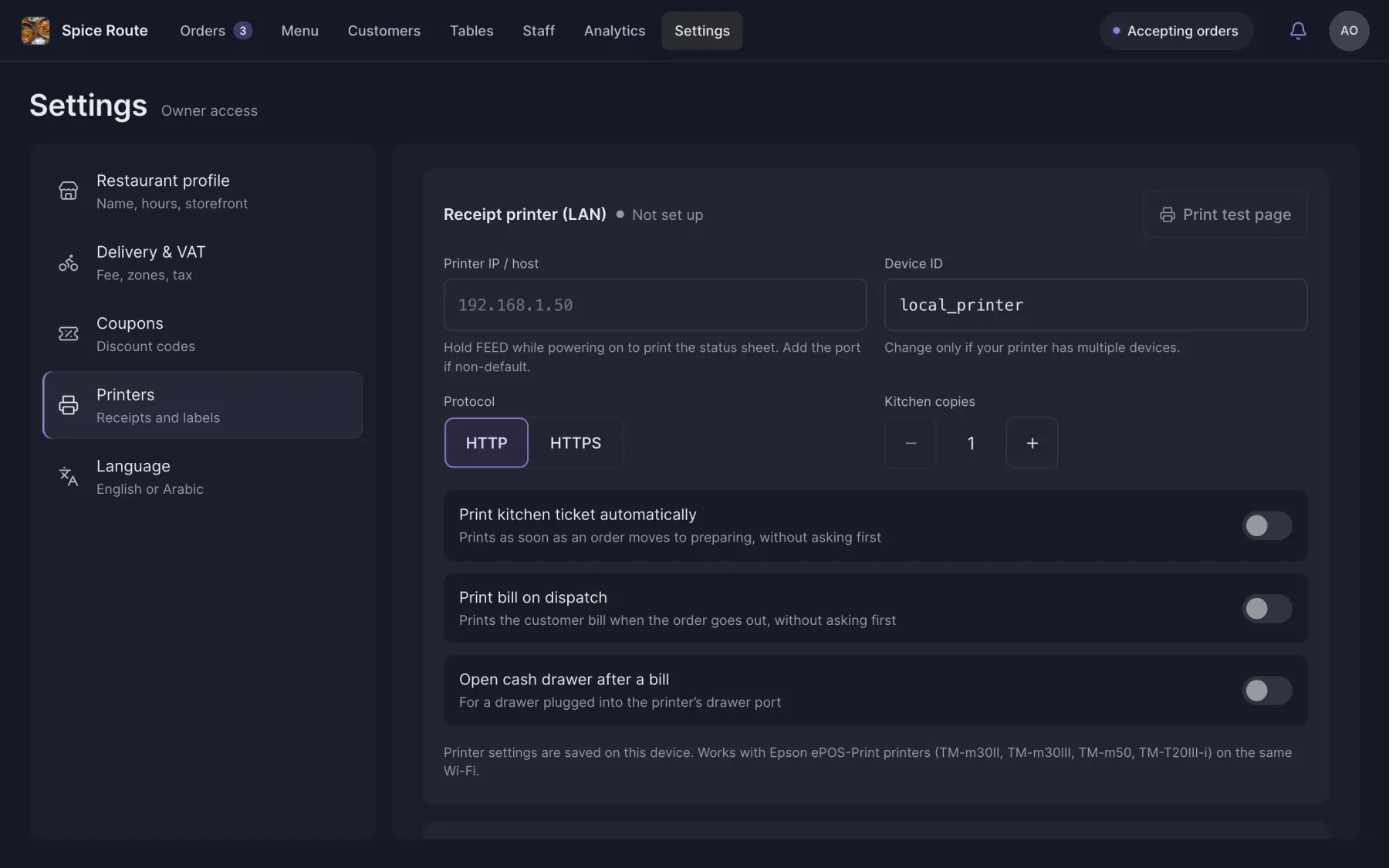
If the test page prints, the status next to the title changes to Connected · test printed just now. If not, it shows Couldn't reach the printer. See When the printer isn't printing.
#The printer options
| Option | What it does |
|---|---|
| Kitchen copies | How many copies of each kitchen ticket to print, for example 2 for the kitchen and the grill. |
| Print kitchen ticket automatically | Prints the kitchen ticket as soon as an order moves to Preparing, without asking first. See Kitchen tickets. |
| Print bill on dispatch | Prints the customer bill when the order goes out, without asking first. See Customer bill. |
| Open cash drawer after a bill | Opens a cash drawer plugged into the printer's drawer port each time a bill prints. |
#No Epson printer?
You can still print. When no receipt printer is set up on a device, Ramzi prints to the Bluetooth label printer if one is connected (see Label printer), or opens your browser's print window so you can use any printer your device can reach, such as an AirPrint or USB printer.